DAP's Jeff Ooi received over RM113,000 from his blog readers after his appeal to them for funds.
Well, sean-the-man isn't asking for quite that much in his appeal for funds.
S$624 or RM1,435 will do nicely because that's the price of the upcoming Playstation 3 (PS3) + Gran Turismo 5 Prologue (GT5P) bundle. It'll be in Singapore shops a few days after it's April 17 debut in the US.
So... go on. Show us how much you love us.
And to really feel the lovin', do throw in another S$450 or RM1035 for the Fanatec Porsche 911 turbo steering wheel. It's a full size leather bound wheel, fully force feedback (both wheel AND pedals), 900 degree turn radius, clutch pedal, 6 speed H gate or sequential shifter and get this... it's fully wireless.
Plus it's got lap wings so that you don't have to clamp it to a table or something. That means you can use it on the sofa watching the TV in your living room.
It's been nearly 2 months since my previous pre-purchase review of the HTC Touch (see: HTC Touch - A touch of heaven in 112gms) and here's a quick follow-up hands on review.
Firstly, as a Windows Mobile 6 PDA - it's excellent for a low-end user like me.
True, the built-in memory's rather dimunitive and yada-yada-yada... But if you bought the Touch, I'm willing to bet that you did so because of the looks and the touch interface - not so much for the computing power and functionality.
Having said that, it's quite usable. Although I must say I don't use the productivity software as much as I thought I would. I'm very much old-school in that I still use a big, paper desktop diary/planner where I can scribble notes, appointments etc into individual boxes for each day. And notes... well, I have plenty of post-it notes in my wallet to remind me what to buy at the supermarket.
And I don't use the Outlook email or any email of the PDA because I'm too cheap to pay for one of those exhorbitant data plans from the telcos.
I have used the supplied MS Office Mobile... maybe once... since I bought this, and only to test out how it looks.
So, I'm strictly wifi and games only. And in this regard, the Touch fares no worse than other PDAs. It probably is better in real life, because I bring the Touch with me everywhere since it's so light. I'm not one to lug a regular fat, ass-sagging PDA around.
I've installed 2 Opera browsers - the Java-based ultra-lite one as well as Opera Mini. I actually find the simple Java one faster and easier to use.
As for games, I'm into strategy games. I don't mind a game of Minesweeper, but for the fact that it's awfully hard to get a good time using the stylus only (the stylus move that replicates the left+right mouse click to expose surrounding squares is very hard to get right consistently and I keep blowing up mines because of it). I'm finding that a lot of simple games that we take for granted on PC eg. Tetris, are a pain in the ass when it's stylus-only play. And many games are still made for the older Windows Mobile platforms, with their obsolete versions of vb and runtime files etc, which makes installation and operation in WM6 a bit tricky if you're not a geek.
So, right now, my main game is Pocket UFO. It's a Russian port of the hugely popular XCOM game for Windows. And I have to say that they were able to fit nearly the ENTIRE game (with the complete tech tree, turn-based combat, maps, sound and music - albeit a much smaller library) into around 10MBs. And it can be installed into the memory card which is great since the Touch has so little built-in memory to spare.
So, that's the PDA part. Now for the phone.
As a phone... the Touch SUCKS! 3 things...
1. Contacts.
WM6 uses Outlook for the contacts and calls lists. And it's okay... although it takes some getting used to if you've always been using regular handphones. But being able to separate or specify whether to use phone and/or SIM contacts would have been nice. So, if you're like me and like to keep a complete list of contacts in your SIM-card (simply because you switch SIM cards a lot... duh), you're farked. Each contact's doubled up. And the nifty Touch-Flo contacts cube... well, you can only use the contacts in the phone, but not the SIM. So to use SIM contacts only (ie. leave the phone contacts empty) will preclude the use of the Touch-Flo contacts cube.
2. SMS / Messaging
Here, it uses Outlook as well. That's fine as it's actually a pretty good text editor. However, the standard WM6 keyboard is atrocious as the individual keys are half the size of a pea and is virtually useless if you don't use the stylus - which in turn makes one-handed messaging impossible. That's why I installed a copy of HTC Phonepad which is an on-screen T9 phone keypad for touch screens. And voila, one handed messaging is possible again. Albeit, it's fairly uncomfortable to do stuff one handed on the Touch because it's so wide. Unless of course, you happen to have hands large enough to handle at least D-cups single-handedly.
3. Voice calls
This is where it really, really sucks.
Call quality is good. Calls are clear and crisp, and the speaker phone is actually better than most regular phones because the speaker is very loud.
Where the Touch drops the ball, and drops it very badly - is in the transceiver itself. Mine kept losing the telco signal (3 or 4 times a day, I guess) but I don't know about it because the signal strength indicator is showing full strength. You don't know the signal's dropped until someone calls in (and immediately gets routed to your voicemail) or you try to call / sms out (that's when you see the signal strength indicator suddenly change from full to searching).
So, 2 issues here:
a. The hardware or software (I don't know which) is incapable of sustaining a consistent signal.
b. The firmware is incapable of updating the signal strength indicator automatically when the signal has dropped. Either it's not programmed to update or it simply can't detect that the signal has dropped when the phone is idle / standby.
It's is so bad that I have to make missed calls every couple of hours... just to kick the transceiver in the pants and prompt it to (re)connect to the network (if the line has indeed dropped). Sometimes when I have a particularly busy day, a slew of SMS and missed call notifications will flood in after I make a missed call. Seriously, it's that bad. And it's pretty damn frustrating when you're waiting for important calls / messages or simply have to be contactable at all times.
And as a result of putting my thoughts into words here, I have just now decided to switch back to my trusty old Sony Ericsson K800i as my primary phone. As for the Touch, I'll use it for the prepaid Malaysian SIM card that I usually use when I'm home (to avoid roaming charges). At the very least, I don't receive life & death calls on the prepaid line.
In conclusion, if I knew what I know now about the Touch... I wouldn't buy it. The phone bug is a definite dealbreaker... unless HTC acknowledges the problem and updates the firmware.
UPDATE: I've just reflashed the ROM (ie. system) to a newer version from the recently launched Wasabi Green edition of the Touch (to version 1.17.707.2G WWE dated 23/7/07 from the older 1.11.707.1B WWE dated 24/5/07 in the Soft Black edition). It also includes a new radio version 02.097.90 (up from the older 02.093.90). According to internet forums, I read that GSM reception is perceptibly improved. Let's hope that it also fixes the line drop bug.
I am absolutely sold on the HTC Touch. After work today, I put my rush order in with my mobile service provider. I'm getting it at S$448 (RM1,009) by re-contracting my mobile service for another 2 years and cashing in my loyalty voucher.
Not a bad deal since I'm currently paying off-contract, S$29 a month for 80 free minutes of local calls and 100 free local sms (for paying using GIRO). Under the new contract, I'll be accessing promotional rates by paying the same $29 each month, but getting either (A) 160 free minutes or (B) 100 free local minutes + 500 free local SMS. The 100 free local SMS for GIRO payment remains.
The HTC Touch retails at S$798 at Singapore's telcos and electronics chain stores like Harvey Norman, Courts and Challenger. Apparently there's an independent retailer in Funan IT Mall selling it for S$739. So, I'm getting it at a S$350 discount. The Touch retails in Malaysia at RM2099 (S$933).
But why? Why a Windows Mobile 6 (WM6) machine when Microsoft has faithfully ported the dreaded blue screen of death from their desktop OS to pocket PCs (PPC)? Why take a risk on a PPC that is known to (a) hang regularly, (b) comes with a regular stylus because the TouchFLO interface unceremoniously dumps you back into the user-unfriendly WM6 environment each time you go beyond the customised finger-friendly launch-screens and (c) needs to be soft-rebooted to reconnect after momentarily losing the cellular signal? (See PPC-SG forums)
And why when the Touch uses a Texas Instruments OMAP processor which runs at a piddling 200MHz? And to drive a power-hungry OS like WM6?
That's like using a rubbish engine like Proton's CAMPRO to drive a heavy SUV.
Well... all the N95 reviews I've read since it was launched confirm that the N95's battery will not last a single day even with a full charge and reasonable use. The N95's the perfect all-rounder, but only if you don't happen to use it very much.
And the iPhone's simply not here yet. And it won't be until the middle of next year. Even then, there's a great possibility that it'll be SIM-locked to a service provider, and of course the proprietry iTunes service. And its battery, it self destructs after 300-400 charges (like the iPod's apparently). And you have to ship the whole damn phone back to Apple (with all your pirated programs and dirty pictures of your girlfriend) to get it replaced. Best of all, Apple will charge you US$85 for this privilege. Thanks, but no thanks.
Most importantly, I'm just infatuated by the Touch's primal sexiness. The sheer slimness of the 13.9mm, keypad-less, flush display casing and of course, the pocket-sympathising 112gm kerb weight. It's like it was made to be caressed. When the salesgirl put it in my hand, I knew I had to have her... (the Touch, but the sales chick wasn't bad either).
With that kind of weight, slimness and size... WIFI and full internet browser that is perfectly designed for off-the-cuff impromptu coffee shop surfing (without having to lug heavy laptops all over the place like a goddamn nerd, just in case there's free WIFI somewhere), decent phone, universally acknowledged friggin loud ringtone (excellent when you're always missing calls in noisy public transport and crowded malls) and a myriad of WM6 3rd party applications... it's pretty damn near the holy grail. I just wish it came with a 5 megapixel camera with Xenon flash and Carl Zeiss lens.
More links: CoolSmartPhones has a long, comprehensive review with lots of youtubes; PCPro has a unique long term review about how it is to live with the Touch (weeks 1, 2 and 3); MSMobiles has scanned the Read-Me-First user manual; and of course http://www.htctouch.com/
And here's the HTC Touch television ad that got me hooked in the first place. I can't get that damn tune out of my head and it won't let me stop humming, dammit!
You wouldn't believe how hard it is to find a Sony Gallery or Sony dealer who actually has a Vaio UX-27GN UMPC (Ultra Mobile Portable Computer) on display. But I did manage to get my hands on one yesterday. What I didn't realise was that Sony doesn't allow customers to take photographs in their stores. So, since the staff chased me out quick smart... this will be a very brief first look.
For a list of specifications, go to Sony's dedicated Vaio website. Lot's of information there, so I won't go into much detail about the specs. I will tell you though that it's rather thick... as thick as a normal 10 or 12 inch notebook. So, while it's not quite a 'pocketable' piece of kit, it feels quite solid and robust.
The 4.5" widescreen LCD was very good at it's native 1024x600 resolution. Clear, bright (hence the Sony moniker of 'Clearbright' LCD) and very sharp. In the photo above, the normal Windows Vista desktop is UN-magnified. I had no trouble seeing what each icon was (including the tiny ones in the systray at the lower right corner), but I did have to squint to read the pop-up balloons when you hover your cursur above the systray icons.
All in all, I think there should be no problem surfing regular internet webpages without any magnification.
In the limited time I had before I was summarily reprimanded by Sony staff, Vista seemed to be acceptably fast. That's not surprising since the UX-27 is specced pretty much the same as a current average notebook computer. Intel Core Solo CPU, 1GB of DDR2 SD-RAM, 40GB Ultra-ATA 5,400rpm HDD (recovery partition takes away 5GB), Intel GMS 945 chipset, blah blah blah. What is amazing though, is it all fits into a 520gm package.
In terms of software, it is spartan. It comes installed with a meagre selection of programs... Norton AV, IE browser and a multi-media suite. There is no productivity software at all. I would have liked a light version of MS Office. Makes me wonder what kind of logic Sony employed to leave that out... since the only people who can afford to buy the UX are people who have to work all the time.
There seems to be 3 ways to navigate.
One, using the fully featured keypad which slides out like a slider phone. I found the keys rather stiff though, so no touch-typing here.
Two, using the trackpoint. The big grey, square button on the upper right side of the UX-27 is the trackpoint. Put your right thumb there and use pressure to move the cursur around. Use it exactly as you would an IBM/Lenovo Thinkpad trackpoint. The 2 buttons (for the left thumb) on the upper left side are the left & right mouse buttons. It took me a few minutes to get used to coordinating both thumbs to make single point and click actions.
The bigger implication of putting the mouse controller on one side and the mouse buttons on the other side however, is that you can't use the UX with one hand. Think about it, the ramifications could be larger than you'd think. For eg, you can't use this standing in a bus or train, and hold on to the support pole / hand straps at the same time. And you're pretty much screwed if you happen to have only one thumb... or none at all.
Three, using the nifty touch screen. Here's me dragging out a highlight box with my finger. Apparently there's a stylus pen supplied, but I couldn't find it.
But when I tried double clicking on icons by tapping the screen, nothing happened. I guess I was ejected before I could read the instruction manual.
A final verdict would be that this is a great gadget. Fully featured (if they include some productivity software), little compromise on computing power and memory (compared to a regular notebook), and provides a full range of connectivity options. Besides, it's an unrivalled head turner and conversation piece. You'll be a geekybabe-magnet if you turn up at your neighbourhood Starbucks and wifi using one of these.
On the downside, it still doesn't fit in your pocket, has no memory upgrade options and the price. It's a testicle shrinking S$3,499 (USD 2,300 or RM8,000).
According to the Today newspaper, the Nokia N95 finally has a price in Singapore... S$1,288 (USD 850 or RM3,000).
Way, waaayyy too expensive if you ask me. That's Mickey Mouse pricing... for now. With the Apple iPhone coming next year, I would expect no less than for the N95's price to drop considerably during the latter part of this year.
I definitely won't be an early adopter like I was for the SonyEricsson K800i.
My cousin stopped over in Singapore on the way back from Tokyo. And knowing what a car nut I am (as is my cousin), he brought me what is in my mind, a damn near perfect holiday souvenir (for both the giver and recipient).
1. It is thoughtful as it's something the receiver wants to receive (car stuff); 2. It is convenient for the giver as it's where he wants to go in the first place (car places); 3. It is unique or particular to the country / place visited (Japan / Nismo); 4. It is affordable (JPY1,400 or USD12) and easy to carry (small & light).
It's an authentic Nismo 350Z keychain / phone dangler he bought from the Nismo shop at Nissan's main showroom in Tokyo.
Yup, those are LED headlamps. Besides the accurate colour scheme and sponsor stickers, there are even tiny brake calipers, a front splitter, rear diffuser etc. The tyres are actual rubber and detachable from the rims.
This is truly unbeatable attention to detail. If only Proton invested the same kind of business ethic, product quality and professional pride in their full size cars, as Nissan/Nismo obviously do (in even their teeny-tiny ones)... Proton would be a much better car company. Great stuff. Thanks cuz.
Gran Turismo HD is a playable prototype. It is not an upgraded version of PS2's GT4 but a bonafide PS3 game. And as the following screen shots will show, it takes full advantage of the PS3's considerable additional computing and graphics power. GT-HD is currently the best indication of the coming full fledged instalment of Gran Turismo, for the PS3. And I have to say... it looks pretty darn good.
For the first time, there'll be bikes as well.
Look at the in-game screen below. This is what the actual gameplay is going to look like. Beautiful! Btw, do you recognise the 10,000rpm tachometer from the picture I took during the Singapore Motorshow 2006? Yup, it's from the Ferrari 599 GTB.
And yes, you've guessed it. For the first time ever, Ferrari's are going to be featured in Gran Turismo. I hope this paves the way for other exotics, like the Lamborghini and please, please the Bugatti Veyron as well.
And just look at the detail of the cars. You can actually see the radiator, the bulbs in the headlamps...
The intercooler, tyre thread on the Lancer Evo. I hope the finished version has the new Lancer.
The detail of the brake calipers, the cross drills...
And also for the first time, you get to see into the cabin. The interior is as authentic and painstakingly detailed as the exterior...
And the Gran Turismo series has the best (and I do mean the BEST!), most realistic driving physics of any driving simulation out there. Forget all the rubbish like Project Gotham Racing, Need For Speed, Ridge Racer and what not. Those are big on graphics (actually very good), but it's as if the programmers just drew what they liked to see, not what the cars authentically look like.
And the driving... it's only in GT that you can actually feel the Vtec power lump at 5000rpm (with the accompanying Vtec wail), the wall of torque as the turbo comes on song, actually sense that the car understeering, oversteering, being nose heavy or tail happy... no other game manages to do that... no other game gives you this level of realism and involvement. I don't know about you... but I can't wait to get my hands on this.
Holy cow, this iPhone is going to be something else.
I don't know, but the holy grail is looking less and less like the Nokia N95 (preview here!), and more and more like the iPhone. I just hope it can play media (music and movies) that is not purchased from Apple iTunes. This, to most OUS (Outside US) customers, will be the deal breaker.
Enjoy all 9 parts of Steve Job's keynote demo at Macworld 2007 introducing the iPhone. The phone is amazing, and it comes with 4GB and 8GB versions.
The multi touch screen is indeed revolutionary. Multi-directional keys, joysticks, arrow keys and styluses are now officially obsolete! Like the phrase that Steve Jobs used: "You had me at scrolling".
1 Intro (iPod + Phone + Internet)
2 User Interface
3 Design
4 THE TOUCH SCREEN! plus Music & Movies
5 Phone
6 SMS & Pictures/Camera
7 Internet (Wi-Fi and EDGE)
8 Safari browser
9 Widgets & Google Maps
I'm not sure if there's a 10th video, but I'll make sure I put it up here if there is.
Update 31 March 2007:The N95 has finally been priced in Singapore at S$1,288 (USD 850 or RM3,000). Much, much too expensive if you ask me. I definitely won't be an early adopter.
>>>>>
I am a person who loves convergence of my electronic gadgets. I hate having to pocket multiple items in my pants for eg. a phone as well as a digital camera. That's why I bought a Sony Ericsson K800i in the first place. I didn't want to choose between carrying 2 gadgets (a phone and a digicam) + 2 chargers (when I'm travelling) vs taking lousy photos when the spontaneous moment matters most.
I'm also into mobile computing. I've got a 1.6kg 12" Lenovo X60 which I use as my main personal computer and I travel with it. But it's way too big to take along everywhere I go. Therefore, every time I want to do the free wifi thing at Starbucks or Coffee Bean etc., I'd have to plan ahead to bring my laptop with me. And that's a huge drag. And if you are going for a movie or a walk in the park after coffee, you'll have to lug the laptop with you... every step of the way until you get home. Like I said... it's a f*cking drag.
And in Singapore, with Wireless@SG, broadband is now available for free at over 500 hotspots in Singapore. The hotspots are set to mushroom over the next year to cover ALL (1oo%) public areas and as such, the coverage will overlap many residential areas as well. Many other cities are also mooting free wifi covering large areas using WLAN.
Therefore, it makes sense if we have something light enough to carry on our person all the time, using which we could wifi for free at any time... while waiting for the train, queueing up for tickets, whatever.
Enter the Nokia N95. Nokia calls it an all-in-one multimedia computer.
Here's a 120gm phone that combines (1) a quadband phone, (2) media player for MP3, MP4s, FM radio with a regular 3.5mm video/stereo audio jack, (3) Wifi/WLAN 802.11 b/g ala PC/PDAs, as well as traditional smartphone networking ie. EDGE, 3G WCDMA and 3.5G HSDPA, (4) Bluetooth 2.0 and InfraRed. (5) Mini-USB 2.0 (with Universal PnP controller!) opening up the possibility of myriad bolt on applications currently enjoyed by PCs, (6) MSOffice, PDF file support, (7) 160MBs of internal memory, MicroSD (8GB and 10GB MicroSD cards will apparently be available soon), (8) 5 Megapixel camera (Carl Zeiss optics and Tessar lens), and (9) DVD quality video recording ie. VGA (640 x 480) at 30 fps (frames per second).
Oh, don't forget the (10) full fledged GPS navigation with voice instructions. Damn useful for people with no sense of direction.
What have we got? A smartphone, PDA, ipod video MP4 player, digital camera, DVD video camcorder and GPS navigator, all in one 120gm package. And with a USB controller, the possibilities could open up.
A must-buy for 2007, if there ever was one. Indications on the net are that the price will be US$700 or S$1050 or RM2500. That's a pretty good early adopter price for a nifty piece of kit like this.
I should mention though that the early impressions of battery life isn't so good. Most sites predict a need for daily recharging on moderate-to-heavy use. Hopefully Nokia will provide a higher capacity battery when the N95 launches in 1Q2007.
And with a 2.6" screen and no proper keyboard, you won't be able to perform the full range of online tasks... like writing a blog like this for instance. I'm also still skeptical about how fulfilling or frustrating an experience, surfing will be, with a 2.6" screen. You'll be scrolling and fiddling like mad with the magnifier box to read a blog page like this.
And while USB 2.0 UPnP is promising, Symbian and even Windows Mobile is definitely not the same as Windows XP. I don't expect at all, to be able to control my DVD burners, external hard discs etc., using any mobile phone's USB, anytime in the foreseeable future. So, there might be a need yet for me to replace my Lenovo X60 with a full fledged Windows XP, 8" screen, Pentium chipped, 800gm UMPC (Ultra Mobile Personal Computer) like Sony's UX, Samsung's Q1 or Asus' R2H.
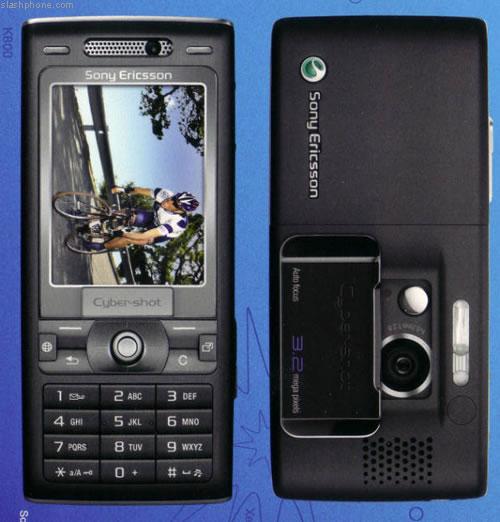
Like I mentioned in an earlier blog, I bought a new phone a couple of weeks ago. It's the SonyEricsson K800i. For a full list of specs, go to www.sonyericsson.com.
It's your everyday 3G phone (video calls), plays MP3s, MP4s, FM radio, Java applications and games, about 68MB of free phone memory (out of the box), a Sony Micro M2 memory card slot and a full featured personal assistant. Nothing special about the phone specs.
PROs:
It's got a big screen with very, very high resolution. At least as good as the later N series phones or PDAs, if not better.
The 3.2 megapixel autofocus camera is excellent. Lots of people have been raving about the Cybershot branding and my feeling is that it's not undeserving of the praise. It has the best flash for a cameraphone yet. A real xenon flash, same as those used in regular cameras instead of the usual LED flash.
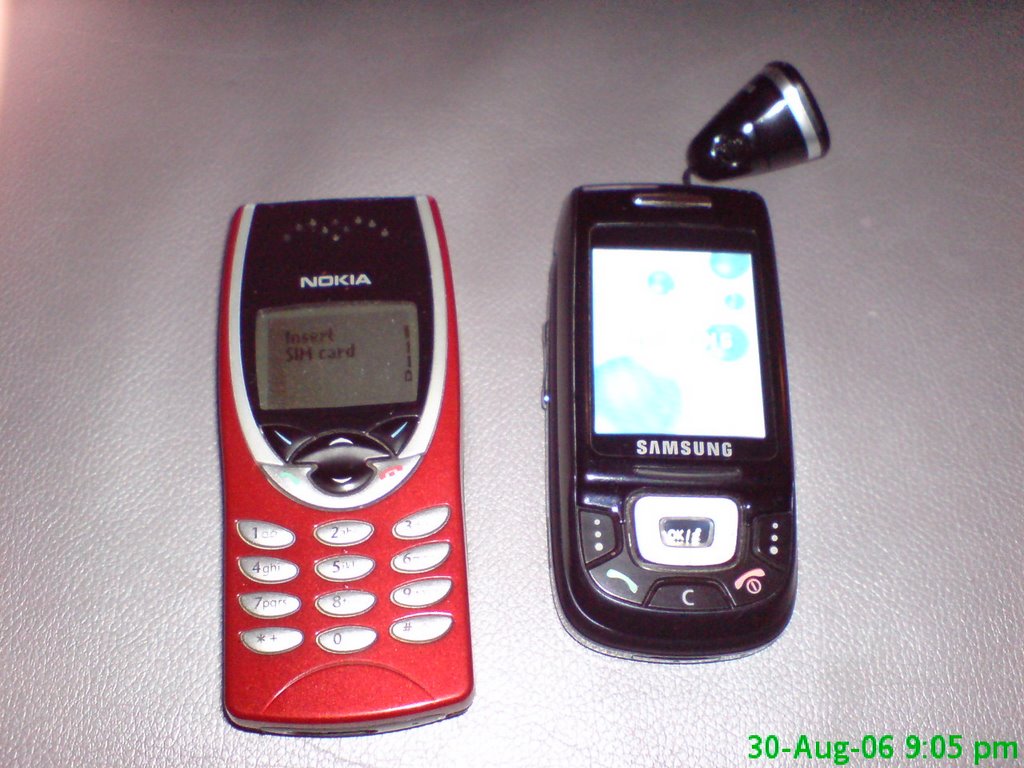
The 1st picture is of my 2 previous phones, taken at 1 megapixel resolution using the K800i - in a darkened room with flash. The next picture is the K800i, taken at 1 megapixel resolution using the Samsung D500C - in the same room with flash. Huge difference in quality. CONS:
The big superb screen, xenon flash and autofocus camera does have its drawbacks. Firstly it's a porker at 115gms. My Nokia 8210 and Samsung D500C are about 80gms each. Makes a huge noticeable difference sliding around in your shirt pocket.
Secondly, the life of the 900mA battery is horrendous. With heavy use, be prepared to recharge daily. Used like a normal phone with occasional photoes, mp3, games etc, you'll be doing well if you squeeze ~2-3 days from it. If you're thinking about using a 2nd battery, forget about it. The battery cover is so tight that I've not managed to remove it since I bought the damn phone (the sales chick put my simcard in for me).
But the smart charging (controlled by the phone's software) is good. It charges very rapidly initially (confirmed by a travel charger that becomes hot to the touch) and only takes about 15 minutes to reach 50%. Then it cools off (literally), taking another 1.5-2 hours to fully charge.
Then you have the proprietry Sony Micro M2 memory card. It's brand new in the market, and like all new stuff and being Sony, it's expensive as hell. About USD 100 for 512MB and the 1GB card is not even available yet.
Lastly, the phone doesn't seem as robust (in a touchy feely sense) as my other phones. In just 2 weeks of usage, I've managed to scratch the screen (no friggin idea how that happened, but I've now pasted a plastic screen protector on it) and my thumbnail somehow managed to delaminate the top layer on one of the soft keys (#5) during an intense game of Java tennis. Now the key has sort of a 'blister' on it. And although the build quality is excellent, you'd really don't want to drop it on the floor. I just don't think it'll survive, but I might be wrong since this is my first SonyEricsson.
OVERALL:
I still love the phone. The camera is priceless, especially for someone like me who flatly refuses to pocket both a phone and a camera. I've been taking fuzzy pictures or none at all for years due to my stubbornness. No more, with the K800i's excellent camera.
A plus point is that there's very little delay between pressing the button and the shutter activation. Almost as fast as a normal digital camera and wayyyyy, wayyyyyy faster than the D500C and any N series I've tested. You also get the Bestpic functionality (which takes 9 photos in rapid succession) and sport mode for taking quick pictures. Auto focus and one button adjustment for landscapes, portraits, night shots, documents etc make it really user friendly.
If you can't make up your mind, here's a review comparing the K800i with other 3.2 or above megapixel phones, N73, Samsung D900, LG KG920 plus the newest N93 which is marketed as a Videocam-phone.
Also, here's an interesting comparison between a 3.2mp K800i with 2 "regular" cameras with typical huge megapixels - a 8mp and a 12mp Canon.
Finally here's a pic of the chickadee who sold me the phone at Carrefour Hypermarket. Taken with a K800i held by sweaty hands, at 3 megapixel resolution, with donno what settings right out of the box.
I've only had this new Lenovo Thinkpad X60 notebook for little more than a month. Already I've had 2 major spyware infections.
It's now about 2:15am and I've just re-staged / reformat & reinstalled my month-old notebook. It'a got infected with spyware yesterday and it just went downhill from there. I had AdAware, Spyware Blaster, Microsoft Defender Beta 2 and Ewido Mal-Ware installed. But even with all this freeware firepower, I still couldn't clean the spyware completely. And the more scans and cleans I ran, the more Windows became corrupted. It got to a stage where even the simple file manager or window explorer became unstable and hung every time I had it open for more than a couple of minutes.
But luckily, the Rescue & Recovery software in the X60 is excellent. About 5GB of the hard drive is partitioned off for the recovery program and ALL installation files. Having not done any backups, I chose to restage or return my X60 to factory specs using this software (which ran independently of Windows). It got everything reinstalled in about 2 hours. This software is so good that you can even connect to the internet or connect a USB drive without booting up Windows.
After reinstalling virtually everything, I've just finished making a recovery backup in case I need it again in the future. This way, I can restore the system to a recovery point, rather than to reinstall the factory specifications.
Damn, it's 2:30am. I need sleep. Good thing I'm done. I'm going to get some shut eye.
I am currently using a rimless titanium frame made by Sillouette. This titanium stuff is great. The whole frame weighs only a few grammes due to it's minimalist design and the intrinsic light weight - high strength qualities of titanium. The model I have is unpainted polished titanium. Therefore, it has a shiny silver finish, that on my 4 year old frame, has not blemished one bit despite the sweat, heat and daily grind. It's just a damn good frame. So good I've gotten one exactly like it for this new pair of spectacles. The price in Singapore is about SGD 310 but since I'm making this newest pair in Focus Point, Ipoh, Malaysia, it will cost around RM 600.
Polycarbonate is supposed to be considerably lighter than regular lens and virtually unbreakable.
Transitions, if you've read my previous blog, is the photochromatic coating which will turn the normally perfectly clear lens dark grey when it is exposed to sunlight (UV). You can have it in brown if you want.
Crizal is a multi coating which is supposed to be anti-reflection, scratch resistant and promotes comfort when working with computer monitor glare. Crizal Alize is the next generation multi coating which supposedly adds hygroscopic qualities to the lens surface and make it smudge resistant and easier to clean as well.
Cost? It's SGD540 in Singapore and about RM1000 in Malaysia.
I just had my eyes checked and the spectacles ordered today. It'll be ready in 2 or 3 weeks.
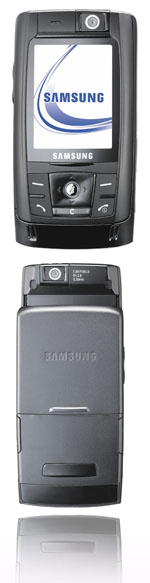
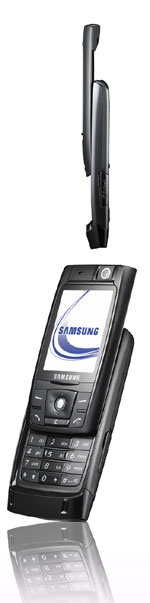
There was a Samsung roadshow booth on Orchard Road yesterday (Friday). I strolled in during lunch time and was instantly captivated by the new D820. I had seen pictures of it and already loved it but once the very cute Samsung promoter put the sleek black slide phone into my hand, I was hooked.
It's actually not as small it seems to be. It's about 2cm longer than my D500 and about 1cm wider. But it's only about 1/2 as thick. It feels good in the hand. It's like the Motorola RAZR V3 but with the slide. Definitely high on the cool factor.
The screen is much more detailed than the D500. It's a very noticeable improvement. One of my major grouses with the D500 was it's tinny sounds. Unless you use those hideous built in ringtones, you practically can't hear the phone on the train or in a bus. I can't even hear it in a crowded restaurant. The D820 has dual speakers (true stereo) and seemed louder as I was getting more intoxicated looking at the promoter. I didn't get to bluetooth one of my MP3 ringtones from my D500 over to the D820 and conduct a good comparison. And I like the usb connector. Apparently using Samsung's Windows software provided, you can connect the phone directly to your PC. It'll be good if we can indeed drag & drop MP3s and 3GPs etc.
So, how is it? It's good. I'd get one that lunchtime if Samsung hadn't offered me a measly S$200 to trade in my D500. I paid S$600 for it exactly one year ago and I'm still stuck with a 12 months contract remaining.
One disappointment though is the D820's slide action. I find it more plasticky and stiffer compared to the D500. The D500's very slick slide action feels almost hydraulically assisted. The D820's is more scrape, not so much slide.
* 15.2mm thin * 90g * 1.3-megapixel camera, camcorder, * MP3 player (MP3, AAC and AAC+ audio files) * 70MB of built-in memory * external MicroSD memory slot. * 2.12-inch QVGA TFT screen with 262,000 colours. * Bluetooth 2.0 support for faster wireless connectivity with Bluetooth stereo headset * Video recording - H.263 and MPEG4 formats (353x288 resolution) * sound recording in AMR and AAC formats * direct output to TV * Speaker phone function with dual speakers * Mobile printing - Bluetooth and PictBridge * E-mail, MMS and SyncML DS * data kit, TV output cable and a 64MB MicroSD memory card.
Photochromatic lens! I learnt plenty about photochromatic lens in the past couple of days. Aiseh, pho-to-chro-ma-tic means lens that darken when it's in sunlight & vice versa. I've been itching to get a pair of glasses with Transitions lens. And damn, is it complicated for the newbie. Some people think Transitions is a brand / manufacturer of lens, some people think Transitions is a type of lens ie. any lens that are photochromatic. Like what Xerox = photocopy, Thermos = vacuum flasks and NOS = nitrous oxide.
Actually, here's what it's all about:
- photochromatic lens are produced in generally one of 2 methods. Method 1 is to produce lens material (glass or plastic impregnated with an active material) that reacts to sunlight. Method 2 is to put a coating of active material that reacts to sunlight - onto ordinary lens.
- Transitions is a lens coating (method 2).
- Transitions is actually Transitions Optical, a JV between PPG and Essilor. Essilor is a major French lens manufacturer, and I think PPG are the ones who came up with the technology that is Transitions. I can't be bothered to look these up, but I think Transitions is the corporate brand vehicle that franchises the technology to lens mfrs or applies the coating onto someone else's lens. They don't produce any lens themselves, just the coating.
- So, if we combine the previous 2 points, the Transitions lens you've just bought are most probably Essilor lens with a Transitions coating. Apparently, other lens manufacturers like Hoya have now incorporated Transitions coatings into their range.
So, now... what does it mean to you & me?
To begin with, don't ask for Transitions lens. There is no such thing. Ask for Essilor or Hoya etc lens that come with Transitions coatings. Essilor for eg. has several types of lens of varying indexes (the higher the index, the thinner the lens) under different model/range names. Each model/range will have a sub-variant with Transitions coatings. And many of these lens have other coatings besides Transitions, like Crizal for eg, for anti reflection and scratch resistance. Hence the term multi-coated lens.
So, what do you do now? Learn more, that's what. Here's a couple of good sites:
"A patriot must always be ready to defend his country against his government."
- Edward Abbey (1927-1989).
I'm a 4th generation Malaysian who's either too stubborn or too damn stupid to know when to shut the fuck up.
 DAP's Jeff Ooi received over RM113,000 from his blog readers after his appeal to them for funds.
 And to really feel the lovin', do throw in another S$450 or RM1035 for the Fanatec Porsche 911 turbo steering wheel. It's a full size leather bound wheel, fully force feedback (both wheel AND pedals), 900 degree turn radius, clutch pedal, 6 speed H gate or sequential shifter and get this... it's fully wireless.